


WEEK 9 EXPERIMENT
Human Zoetrope
👁️🗨️ NOTES: This is an experiment from Week 9. A small experiment about using myself as the subject to create a Zoetrope. This experiment kind of alike to Chronotography technique!!!

✔️Pins
✔️Phone tripod.
✔️ Camera Tripod.
✔️ Camera card.
✔️ My phone.
✔️ Measure tape (I replace it with an image of a cord)
✔️ Sony Camera a7ii with 28-70 lens.
✔️ A tape.
👆 Up here is what I prepare for my Human Zoetrope experiment. I am also being helped by my mom!!! Which you can see through my video down here.
✔️
👁️🗨️
👉
✔️ Information about the circle in my zoetrope video experiment:
_ r = 5 metres. (= 500cm)
_ 16 points. (= 16 frames)
👁️🗨️So my process was kind of simple. I wanted to make a video which is recording my movement when going around follow the 16 points that have been pinned to the ground. So with my mom's help, I was able to record myself moving.
👁️🗨️ My Thoughts:
👉 I just feel a little disappointed because the tripod was the thing that creates the problem. I think one of the reasons was when spinning the upper body of the tripod made the camera being athwart. So that creates the unbalance of the video.
👁️🗨️ Here is my video going around the circle that I already create.
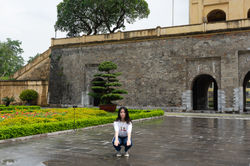
✔️ The place that I record video: (Because of Covid-19 so everywhere is being closed and because I want a big wide place to create a big circle so I have asked my mom to come to her workplace to record this video!!) _ Thang Long Imperial Citadel.
✔️Before having the video above, I have to record 3 to 4 of it because I forgot the action that I wanted to made in each position. So here are the pre-video.


✔️ So besides recording a video I also have a backup plan for it which I had started to take 16 pictures of all positions I have marked on the ground. And, here are my photographs.
👁️🗨️ My Thoughts about my photographs:
_ I feel again disappointed with the photographs 😔 I feel so sad 😔 because the quality was not good at all. When I have taken the photographs, I forgot to set up the camera's focusing setting. It was in [Wide focusing] mode when I took the photographs instead of [Center focusing] mode 😔
👉 So that's why you can see me in all the photographs that are blurred. 😔😔😔
👁️🗨️ Here is my video recording of the taking photographs process. It took me half an hour to help myself out of this...
 |  |  |
|---|---|---|
 |  |  |
 |  |  |
 |  |  |
 |  |  |
 |
✔️ But still, I try to do some experiment with the photographs!! So my intention with this experiment was just like creating an animation reel:
👇 This is the first experiment.

👇 This is the final look of the experiment.

✔️ I also recorded the process that I made the animation reel. You can see it down here with 2 separated videos:
👉 This is also what I want to do with the video!! Like when the video is moving you can see where I stopped in each position then I will make the subject (me) freeze in each frame. (you can see the video in the first attempt of this experiment)
_ So here is a quick video I made to show you the animation reel.
👁️🗨️ My thoughts:
_ Compare the two experiment above, you can easily catch the difference was just the last frame on the right side of the animation reel. And because I set up the times for 10s to take each photograph one by one so it is actually just have a feeling really roughly making
_ I other case, I actually feeling "Alright this is kind of too easy?" and I actually want to make more than just animation reel or anything.